Footer

    Download on the App StoreGet it on Google Play

    關於

    • 認識 VoiceTube
    • 學習服務介紹
    • 加入我們
    • 常見問題
    • 熱門搜尋主題
    • 企業英文培訓
    • 社群推廣分潤計畫

    服務總覽

    • 口說挑戰
    • 單字單句本
    • Hero 智能學習
    • Tutor 真人家教
    • Vclass 名師課程
    • Campus 教育版
    • 字典查詢
    • 匯入影片並生成字幕
    • 部落格

    精選頻道

    影片分級

    • A1 初級
    • A2 初級
    • B1 中級
    • B2 中高級
    • C1 高級
    • C2 高級

    隱私權˙條款˙
    ©2026 VoiceTube Corporation. All rights reserved

    carousel

    US /ˌkærəˈsɛl, -ˈzɛl/

    ・

    UK /ˌkærə'sel/

    C1 高級
    n.名詞喧鬧的酒會
    My suitcase was the only one left on the carousel

    影片字幕

    AI 是一項「產品」還是一個「功能」? (AI the Product vs AI the Feature)
    08:16AI 是一項「產品」還是一個「功能」? (AI the Product vs AI the Feature)
    • Like I think TikTok is maybe the best example of this opposite version, where TikTok, it's a vertical video carousel with an algorithm that learns really quickly what video you want to see next, right?

      我認為 TikTok 也許是這種相反版本的最佳範例,TikTok 是一個垂直視頻傳送帶,它的算法能快速瞭解你下一步想看什麼視頻,對嗎?

    • Like, I think TikTok is maybe the best example of this opposite version where TikTok is, it's a vertical video carousel with an algorithm that learns really quickly what video you wanna see next, right?

      現在,這是他們的一大特色。

    A2 初級

    不敢說真話的傳記電影?評麥可傑克森傳記片《Michael》(Michael Is What Happens When A Biopic Can’t Tell The Truth)

    09:34不敢說真話的傳記電影?評麥可傑克森傳記片《Michael》(Michael Is What Happens When A Biopic Can’t Tell The Truth)
    • The genre's currently a carousel that keeps spinning but never actually moves forward.

      我們可以讓演員看起來就像 87 年的麥可一樣,

    • The genre's currently a carousel that keeps spinning but never actually moves forward.

      這個類型目前就像一個不斷旋轉卻從未真正前進的旋轉木馬。

    B1 中級

    優雅上飛機!給女孩們的 12 項機場密技 (12 Airport Life Hacks Every Girl Should Know | Brooklyn and Bailey)
    04:28優雅上飛機!給女孩們的 12 項機場密技 (12 Airport Life Hacks Every Girl Should Know | Brooklyn and Bailey)
    • So if you want to be able to identify your bag when it's coming around the carousel, just tag it with something really identifiable, like my cheetah print little tag that I have right here.

      這樣你有時間過安檢、顧行李,或許還能找點東西吃。

    • So if you want to be able to identify your bag when it's coming around the carousel,

      為了讓你的行李在轉盤上更顯目,
    B1 中級

    你有沒有好奇過,行李送去託運後會經歷些什麼呢? (What Exactly Happens When You Check a Bag)

    07:00你有沒有好奇過,行李送去託運後會經歷些什麼呢? (What Exactly Happens When You Check a Bag)
    • So once he gets to the carousel, he doesn't have to wait long.

      所以,一旦他到了行李轉盤那裡,就不用等太久了。

    • The airport is designed such that Chet's walk there takes about the same amount of time as unloading the plane and driving the bags over, so once he gets to the carousel, he doesn't have to wait long.

      Chet 向他的航空公司投訴,他們將索賠上傳到 World Tracer。

    B1 中級

    初學者英文:在機場 (At the Airport) (English for Beginners - At the Airport)

    04:36初學者英文:在機場 (At the Airport) (English for Beginners - At the Airport)
    • Tara has marked a big cross on her suitcase, so she will be able to recognize it easily when it arrives on the luggage carousel for her to collect at Munich Airport.

      好在她的班機還算準時

    • carousel for her to collect at Munich airport

      在慕尼黑機場為她準備的旋轉木馬。

    B1 中級

    關於你的 Nothing (Nothing on you)

    04:39關於你的 Nothing (Nothing on you)
    • Either where I go or just for one, either down the carousel or just wander around with your direction, no limitations, they are all there.

      Nothin' on you baby.

    A2 初級

    芝加哥35個必去景點|旅遊攻略指南! (35 Things to do in Chicago | Top Attractions Travel Guide)

    13:33芝加哥35個必去景點|旅遊攻略指南! (35 Things to do in Chicago | Top Attractions Travel Guide)
    • The pier is lined with fun rides, including a giant Ferris wheel, a wave swing, and a carousel.

      包括巨型摩天輪,一揮手搖擺, 和旋轉木馬。

    • carousel.

      我們被殭屍活活吃掉畢竟。

    B1 中級

    【WDW】與瑪麗·包萍的迎賓時刻【聖誕節第五天】! (【WDW】メリーポピンズとグリーティング【グリスマス5日目】)
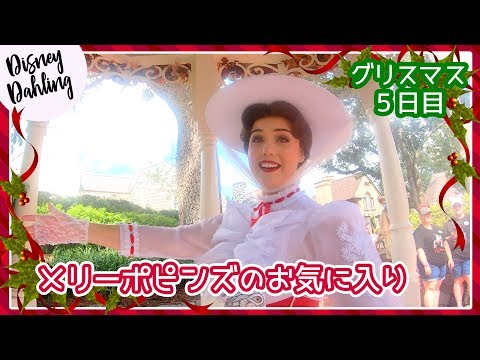
    01:22【WDW】與瑪麗·包萍的迎賓時刻【聖誕節第五天】! (【WDW】メリーポピンズとグリーティング【グリスマス5日目】)
    • Have you found your way to the carousel yet? Not yet. You haven't?

      你找到旋轉木馬了嗎? 還沒有 你還沒找到?

    • Have you ever participated in a carousel horse race? No, I haven't either. Well, I do suppose there was this one time that Bert and I were riding carousel horses, and they jumped right off. It was all the way after the races where I came in first place. I don't think the children believe me when I tell them. Maybe they're just a bit jealous they didn't come in first place. I believe you. Thank you.

      您參加過旋轉木馬賽馬嗎? 不,我也沒有 好吧,我想有一次伯特和我騎著旋轉木馬,他們直接跳了下來。 比賽結束後,我得了第一名。 我覺得孩子們不相信我說的話 也許他們只是有點嫉妒自己沒得第一名。 我相信你 謝謝你

    A2 初級

    Figma 自動版型入門教學 (2025)!零基礎也能學會! (Figma Auto Layout Tutorial for Beginners (2025))

    08:51Figma 自動版型入門教學 (2025)!零基礎也能學會! (Figma Auto Layout Tutorial for Beginners (2025))
    • This arranges your elements vertically The third one is Horizontal It arranges your elements horizontally The fourth one is Grid This is a new update still in beta It allows you to edit the layout in a grid format We'll go over each of these in detail Don't worry, by the end of this video, you'll understand how to use every single button here Let us start with the Freeform setting You'll see W and H right below this button W stands for Width and H stands for Height You can use these fields to adjust the size of your element You can type in a number, hover over the letter and drag to change it Or do it the most organic way Hover over the edge of the element and drag until you see a number you like I like multiples of 4 To the right, you'll see a square icon If you click it, it locks the aspect ratio of the element So the width and height stay proportional Let's say you are redesigning a YouTube thumbnail A YouTube thumbnail has a specific aspect ratio So locking it can prevent your cat, your kid, and mostly you from messing it up One very, very important thing Make sure you select the right layer In a real design project, you'll have so many layers So if you want to lock the aspect ratio of this circle, let's say Make sure to select the circle, not the frame That way, your circle will stay perfectly as a circle Not too fat, not too short Below Width, you'll find a field to adjust the gap between elements This only appears in freeform mode when your elements share the same gap At the bottom, you'll see the clip content checkbox This is super helpful when your frame is smaller than the elements inside For example, in a carousel design Checking clip content will hide the parts of the elements that extend outside the frame Alright, next let's move on to vertical and horizontal layouts These two are really similar So let's take a look at the horizontal one When you select a horizontal layout A wrap icon will appear on the right If you click it, the elements inside the frame will automatically wrap into multiple rows Perfect for when there's not enough space in a single line Below that, you'll see width and height settings Each with a drop-down If you click the drop-down, you can set the size to hug This makes the frame automatically adjust to fit its contents For example, if you add a new circle to the frame The width will automatically expand to hug the new element You can also set minimum or maximum values for width and height Let's say you don't want the frame to be wider than 750 pixels Just set the max width to 750 And even if you add more elements, the frame won't go beyond that limit Right below width, you'll see nine alignment options for your elements inside the frame These let you align your content to the top, center, bottom, left, right Basically any corner or edge you want You might not notice much difference right now if your frame is hugging the elements But once the frame is bigger, this alignment will become very obvious Next is the gap setting Click the drop-down and you'll see an option to set it to auto This automatically adjusts the space between elements to fill the frame evenly So satisfying to see everything snap into place Below that are your padding settings Padding is the space between the edge of the frame and the element inside it By default, padding is applied equally on parallel sides But if you click the little toggle next to it, you can customize the padding for each side Just like this Next, let's move to grid A brand new and still in beta feature in Figma Alright, I have a love-hate relationship with this, okay?

      第三個是橫向(Horizontal) 將元素橫向排列 第四個是網格(Grid) 這是一個新的更新,仍處於測試階段,它允許你以網格格式編輯佈局 我們將詳細介紹其中的每一個按鈕 別擔心,在本視頻結束時,你會明白如何使用這裡的每一個按鈕、讓我們從 "自由格式 "設置開始吧 你會看到 W 和 H 就在這個按鈕的下方 W 代表寬度,H 代表高度 你可以使用這些資料欄來調整元素的大小 你可以輸入一個數字,將鼠標懸停在字母上,然後拖動來更改它 或者用最簡單的方法 將鼠標懸停在元素的邊緣,然後拖動,直到看到你喜歡的數字為

    • For example, in a carousel design, checking clip content will hide the parts of the elements that extend outside the frame.
    B1 中級

    如果蓋一座十億層樓高的大樓會發生什麼事? (What if you built a billion-story building?)

    03:56如果蓋一座十億層樓高的大樓會發生什麼事? (What if you built a billion-story building?)
    • Just like how a swing carousel throws you outward, anything spinning in sync with Earth's equator is thrown outward.

      就像旋轉鞦韆會把你往外甩,任何在地球赤道同步旋轉的東西都會被向外甩。

    • Just like how a swing carousel throws you outward, anything spinning in sync with the Earth's equator is thrown outward.

      而且它仍然不到十億層。

    B2 中高級